Data Security
TextForge is designed around a simple principle: we can't leak data we don't have. This page covers how we protect your data — our pass-through architecture, what you can attach to emails, and what happens when you delete your account.
Pass-Through Architecture
TextForge acts as an approval layer between your AI agent and Gmail — not a data warehouse. Email bodies and attachments flow through TextForge but are not stored long-term.

What we store:
- Email drafts (created by your AI agent, along with their approval status and history)
- Thread metadata (subject lines, participants, timestamps — for search and display)
- Approval decisions and audit log entries
- Encrypted OAuth tokens and hashed API tokens
- Account settings and subscription data
What passes through:
- Email bodies from your Gmail threads (fetched on-demand, not retained)
- Attachments (validated and forwarded, not stored)
- AI model outputs beyond the draft itself
This means a breach of TextForge's database would not expose the content of your sent or received emails.
Encryption
TextForge encrypts data at every layer:
- In transit: All connections use TLS 1.2+. API endpoints, MCP connections, and webhook callbacks are HTTPS only.
- At rest: Stored data (drafts, metadata, OAuth tokens) is encrypted using AES-256.
- OAuth tokens: Your Gmail refresh token is encrypted with a per-account key. Even if our database were compromised, your Gmail token could not be decrypted without the corresponding encryption key.
- API tokens: Only a hash of each API token is stored. The raw token is shown once at creation and never stored. A database breach would not expose usable tokens.
- Webhook signing secrets: Your webhook secret (prefixed with
whsec_) is shown once when you create the webhook. Only a hash is stored — we can't retrieve it, and neither can an attacker.
Attachment Security
Every file attached to an email through TextForge is validated and scanned before it's accepted. The maximum file size is 20 MB per attachment.
Supported File Types
You can attach the following file types:
- Documents: PDF, DOCX, DOC, XLSX, XLS, PPTX, PPT, RTF, ODT, ODS, ODP
- Images: PNG, JPEG, GIF, WebP, BMP, TIFF
- Archives: ZIP only
- Text: TXT, CSV, MD, JSON, XML
Executable files, scripts, and other potentially dangerous file types are blocked — including everything Gmail itself would reject. HTML, SVG, and JavaScript files are also excluded.
How We Keep Attachments Safe
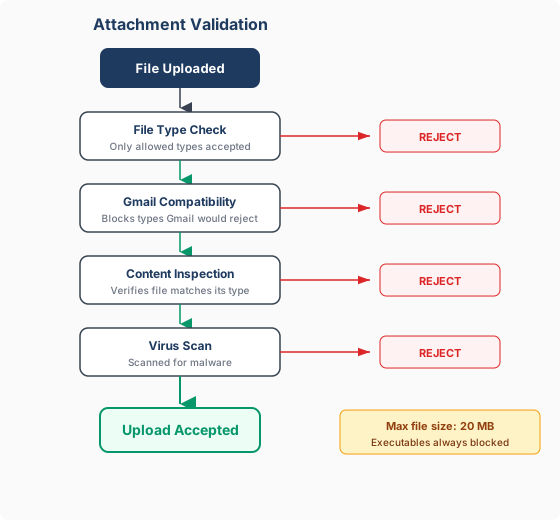
TextForge validates every attachment through multiple layers of checks:
- File type verification — We check that the file actually matches what it claims to be. A file renamed from
.exeto.pdfwon't get through — we inspect the actual file content, not just the extension. - Gmail compatibility — Files that Gmail would reject at send time are blocked upfront, so you get immediate feedback instead of a confusing failure later.
- Virus scanning — Every attachment is scanned for known malware and viruses before it's accepted.
- No executables — Programs, scripts, and installers are always blocked, regardless of how they're named or packaged.
Gmail Permissions
TextForge requests the minimum Gmail permissions needed to operate:
- Read your email threads — so your AI agent has context when drafting replies
- Send emails on your behalf — only after you explicitly approve each draft
We do not request access to Google Drive, Calendar, Contacts, or any other Google service. You can revoke TextForge's access at any time from Google Account Permissions.
Account Deletion & Data Retention
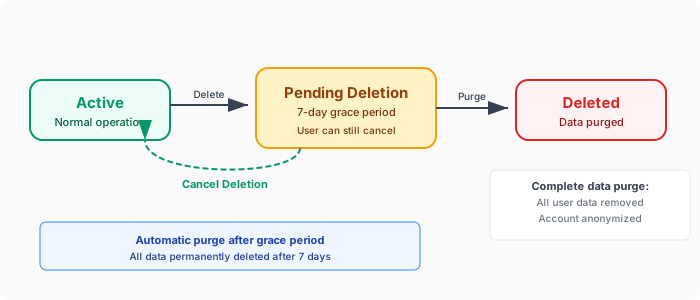
When you delete your TextForge account, your data is removed in a controlled, reversible process.
How It Works
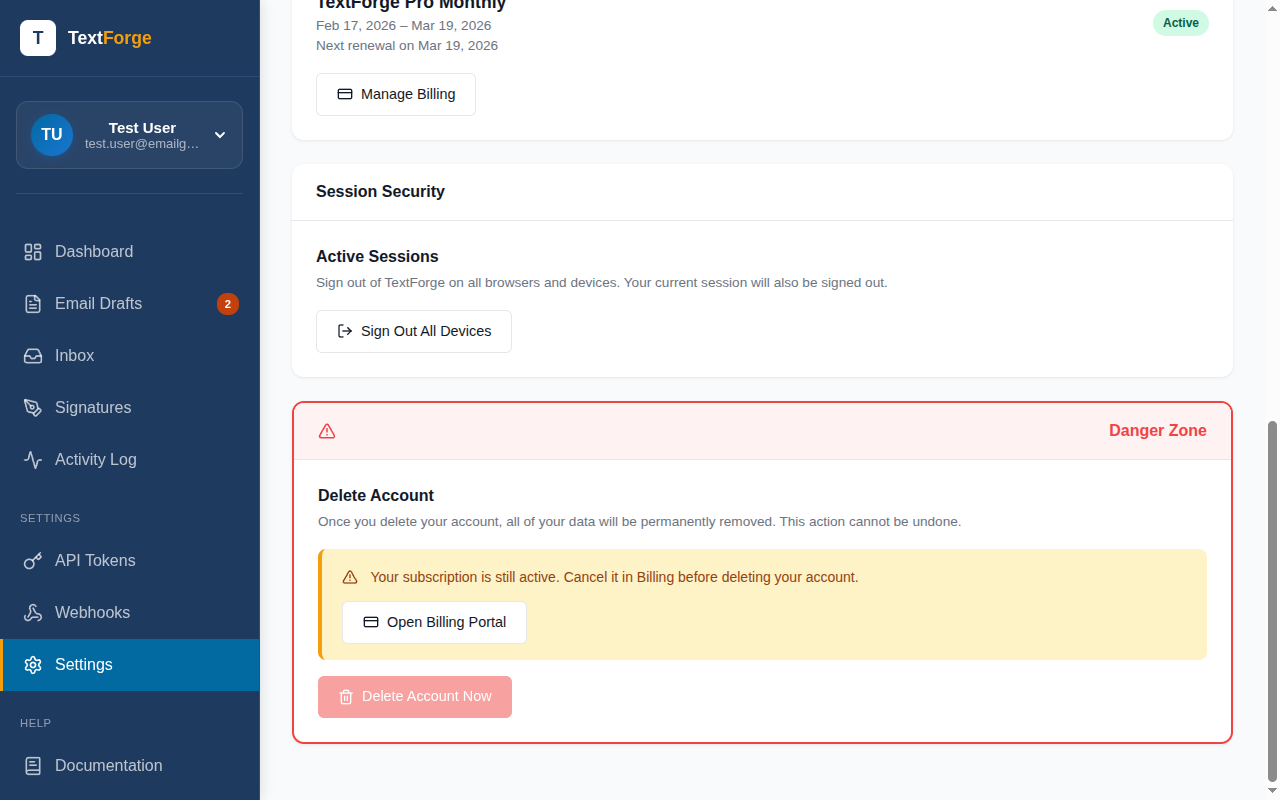
- You cancel your subscription. Your account enters a 7-day grace period after the billing period ends.
- During the grace period, you can resubscribe and return to normal operation. Your data remains intact.
- After 7 days, your data is permanently deleted.
- Or skip the wait — go to Settings and immediately purge all your data at any time after cancellation.
What Gets Purged
When your account is permanently deleted, all of your data is removed:
- All email drafts, threads, and attachments
- Your Gmail connection and OAuth tokens
- API tokens and email signatures
- Webhooks and delivery history
- Subscription and billing data
- Activity log entries
Your user record is anonymized — your email, name, and profile data are cleared. No personally identifiable information is retained.
Audit Trail
TextForge maintains a comprehensive audit trail for every significant action:
- Draft created, edited, approved, rejected, or deleted
- Email sent or send failed
- Reply received
- Webhook delivered (endpoint, response code)
- Token created or revoked
- Account settings changed
All audit entries include timestamps, the acting user or token, and relevant entity IDs. The audit trail is available from your dashboard. Entries are retained while your account is active.
Selective Sync & Inbox Access
TextForge limits how much of your inbox it can access, reducing your data exposure surface:
- Pro plan — Selective folder sync: Choose exactly which Gmail folders (labels) TextForge can access. Only threads in selected folders are synced. Everything else stays private.
- Solo plan — 30-day window: TextForge syncs only the most recent 30 days of email threads. Older conversations are never fetched.
In both cases, TextForge operates on metadata and thread IDs — email bodies are fetched on-demand when you view a thread and are not stored long-term.
AI Agent Data Access
TextForge does not send your email data to AI models. Here's how it works:
- Your AI agent calls TextForge's API — the agent reads threads and creates drafts through scoped API tokens. TextForge is not aware of what the agent does with the data.
- TextForge does not call AI models — we don't use GPT, Claude, or any other LLM to process your emails. The AI processing happens on your side, under your control.
- Scoped tokens limit exposure — each AI agent gets a token with only the permissions it needs. An agent that drafts emails doesn't need (and shouldn't have) access to approve them. See Token Permissions Reference for the full scope list.
See Also
- Privacy & Security Overview — Quick overview of TextForge's security posture
- Token Permissions Reference — Fine-grained permission scopes
- API Tokens & Permissions — Creating and managing tokens