Token Permissions Reference
TextForge uses fine-grained permissions to control exactly what each API token can do. Instead of granting all-or-nothing access, you assign specific scopes to each token — so your AI drafting agent can create drafts but can't approve them, and your monitoring dashboard can read data but can't modify anything.
This page is the complete reference for all 17 permissions and 4 preset scopes. For creating and managing tokens, see API Tokens & Permissions.
Permission Groups
TextForge organizes its 17 permissions into 5 groups. Each group controls access to a specific area of the platform.
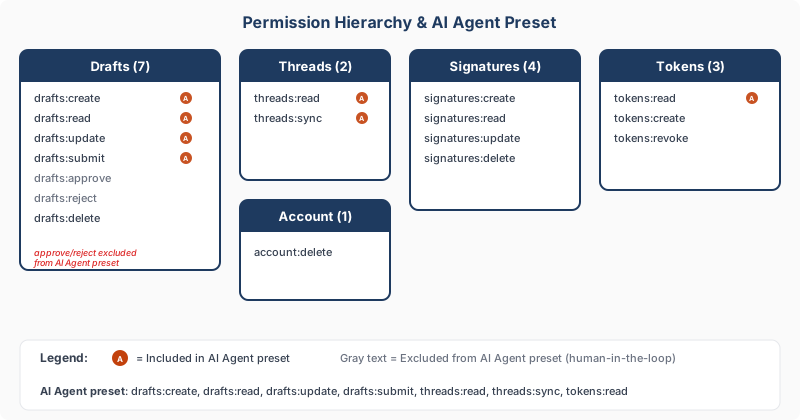
Drafts (7 permissions)
| Permission | Description |
|---|---|
drafts:create |
Create new email drafts via API or MCP |
drafts:read |
View existing drafts, their content, and status |
drafts:update |
Edit a draft's subject, body, and recipients |
drafts:submit |
Submit a draft for human approval |
drafts:approve |
Approve a draft for sending |
drafts:reject |
Reject a draft with feedback |
drafts:delete |
Permanently delete a draft |
Important
The drafts:approve and drafts:reject permissions are deliberately excluded from the AI Agent preset. This enforces the human-in-the-loop principle — your AI can draft and submit emails, but only a human can approve or reject them.
Threads (2 permissions)
| Permission | Description |
|---|---|
threads:read |
Read email threads, messages, and attachments |
threads:sync |
Trigger an inbox sync to fetch new messages from Gmail |
Thread permissions let your AI agent see conversation context when drafting replies.
Signatures (4 permissions)
| Permission | Description |
|---|---|
signatures:create |
Create new email signatures |
signatures:read |
View existing signatures |
signatures:update |
Edit signature content |
signatures:delete |
Remove a signature |
Tokens (3 permissions)
| Permission | Description |
|---|---|
tokens:read |
List existing tokens (names and metadata only — never the secret) |
tokens:create |
Create new API tokens |
tokens:revoke |
Revoke other tokens |
Warning
A token with tokens:create can create new tokens with any permissions, including permissions the original token doesn't have. Grant this scope carefully.
Account (1 permission)
| Permission | Description |
|---|---|
account:delete |
Permanently deletes your account and all data |
This is a destructive operation. Only grant it to tokens that genuinely need it.
Preset Scopes
TextForge provides 4 preset scopes for common use cases. When creating a token, you can select a preset and then customize it.
| Preset | Permissions Included | Use Case |
|---|---|---|
| AI Agent | drafts:create, drafts:read, drafts:update, drafts:submit, threads:read, threads:sync, tokens:read |
AI tools that draft emails for your review |
| Approver | drafts:read, drafts:approve, drafts:reject, threads:read, tokens:read |
Humans or services that review and approve drafts |
| Full Access | All 17 permissions | Trusted administrative access |
| Read Only | drafts:read, threads:read, tokens:read |
Dashboards, monitoring, and analytics |
The AI Agent preset deliberately excludes drafts:approve and drafts:reject. This is the core of TextForge's human-in-the-loop design — no matter how trusted your AI agent is, the final send decision stays with a human.
The Approver preset is the complement: it can approve or reject drafts but can't create them. Together, AI Agent + Approver enforce a separation of duties.
See Also
- API Tokens & Permissions — Creating, rotating, and revoking tokens
- Data Security — How TextForge protects your data
- Privacy & Security Overview — Quick overview of how TextForge protects your data