Email Signatures
Your email signature is automatically appended to every email sent through TextForge. Set it up once, and every draft your AI creates will include your professional sign-off.
Setting Up Your Signature
- Go to Settings → Signatures
- Click Create Signature
- Use the rich text editor to design your signature
- Click Save
The editor supports formatting like bold, italic, links, and images.
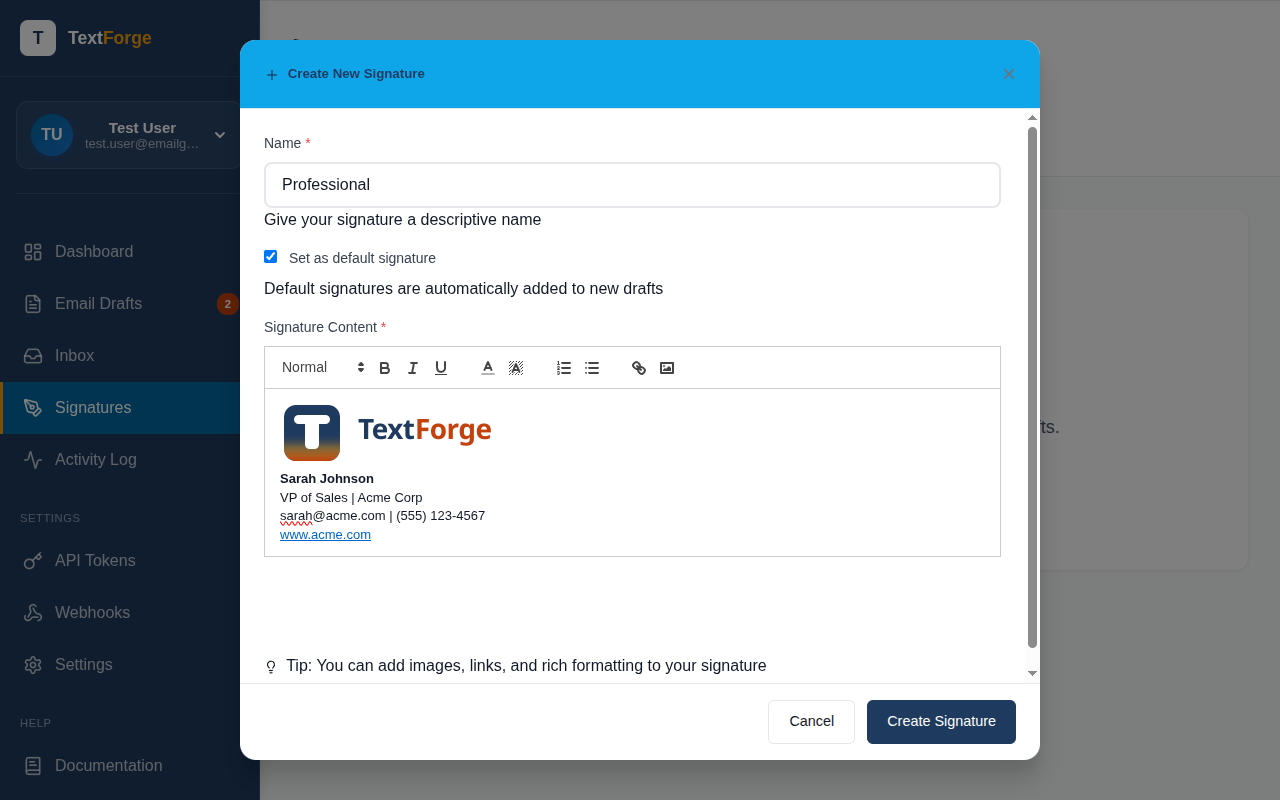
What to Include
A good email signature typically has:
- Your name — First and last name
- Your title — Job title or role
- Company name — Where you work
- Contact info — Phone number, email, website
- Social links — LinkedIn, Twitter/X, etc. (optional)
Keep it concise. A signature that's longer than the email itself doesn't make a great impression.
How Signatures Work with Drafts
When your AI agent creates a draft through the API, TextForge automatically appends your active signature to the email body before sending. Your AI doesn't need to know about or include your signature — TextForge handles it.
This means:
- Your AI focuses on the email content, not boilerplate
- Your signature stays consistent across all emails
- You can update your signature in one place and it applies everywhere
Managing Multiple Signatures
You can create multiple signatures and set one as your default. This is useful if you:
- Have different signatures for different contexts (formal vs. casual)
- Want a shorter signature for quick replies
- Need different contact information for different roles
Switch your active signature anytime from the signatures settings page.
Editing Your Signature
To update an existing signature:
- Go to Settings → Signatures
- Click on the signature you want to edit
- Make your changes in the editor
- Click Save
Changes apply to all future emails. Already-sent emails keep the signature they were sent with.